ABChecklists
Checklists, short enough to follow
The other pages explain. This one only reminds. I keep it open on Phone 2 while I work on Phone 1, which is the neatest use of two phones I know.
Which number do I give out?
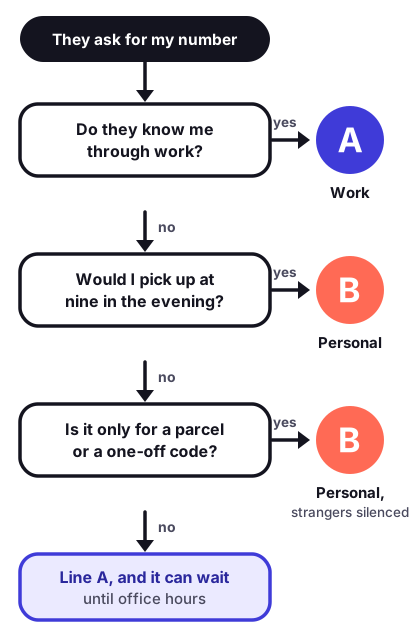
New line day
- Add the line on Wi-Fi, with the operator’s code or card to hand.
- Give both lines short labels you will still understand in a year.
- Set the default voice line and the data line.
- Pin a preferred line to the contacts who must never get the wrong one.
- Call each number from another phone. Record both voicemail greetings.
Before a trip
- Add and label the travel line a week ahead. Keep it off.
- Screenshot the cellular screen as it is today.
- Home line: data roaming off. Travel line: low data mode on.
- Download maps and tickets.
- On landing: travel line on, make it the data line, check the two rows of bars.
- Back home: reverse it, then compare with the screenshot.
New phone day, with two lines
- Ask each operator how their eSIM moves. Some transfer during setup, some need a fresh code.
- Do not erase the old phone until both numbers have rung on the new one.
- Re-check labels, default line and data line. They do not always survive the move.
- Open each chat app once and let it confirm the number.
- Pair the watch to the new phone last, when everything else is quiet.
Handing a phone down
- Make a backup and confirm it finished today.
- Unpair the watch, if one is paired.
- Sign out of your account on the device. This is what releases the activation lock.
- Erase all content and settings. When asked about eSIMs, delete them unless you are keeping the phone.
- Take out the card and wipe the case.
- Let the new owner set it up as theirs. For a child, start from a child account in the family group.
- Check your account’s device list a day later. The old phone should be gone from it.