Home line, travel line
This is where a second line stops being a convenience and becomes the whole point. Your number stays reachable, and the data comes from somewhere local.
- Stays in the phone the whole trip
- Calls, texts and sign-in codes
- Data roaming switched off
- Still the number people know
- An eSIM added before leaving
- Mobile data only
- Data roaming switched on, if it asks
- Removed once the trip is over
The five moments that matter
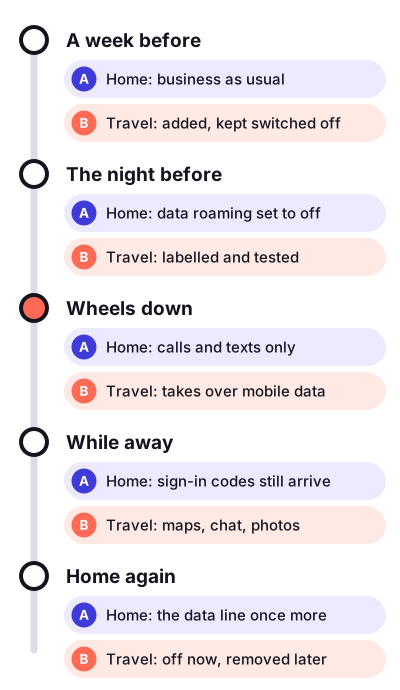
- A week beforeCheck that the phone is not tied to one operator; the general “about” screen says whether there is a restriction. Add the travel line while you are on home Wi-Fi, label it Travel, and leave it switched off.
- The night beforeDownload offline maps and tickets. Turn data roaming off on the home line now, while you are calm, not at the luggage belt.
- Wheels downSwitch the travel line on, make it the data line, and check that automatic data switching is off. Look at Control Centre: two labels, two sets of bars.
- While awayChat apps carry on with your home number. Codes from the bank arrive on the home line. Answering a call on the home line may cost roaming rates; ask your operator before you go, because I do not give tariff advice.
- Home againMake the home line the data line and switch the travel line off. I delete it a week later, once I am sure nothing is still attached to it.
Small things that made trips easier
Give the travel line a diet
There is a low data mode per line. On the travel line I turn it on and stop photos and backups from using mobile data, so the allowance goes on maps and messages.
One line feeds two travellers
When two of us travel, only one buys the travel line. That phone shares its connection as a hotspot, and the other phone joins it like any Wi-Fi. The giver’s battery drains faster, so the giver gets the charger.
Screenshot the settings before you change them
Before I touch anything I take one screenshot of the cellular screen. Ten days later I do not have to remember how it was; I just make it look like the picture.
Last trip: nine days in early November 2026. Surprises: one, and it was the hotel kettle. The short version is on the checklists page.