Living with two devices
My previous iPhone did not go in a drawer. It became Phone 2: it lives on a shelf, plays music, and once in a while rescues the day.
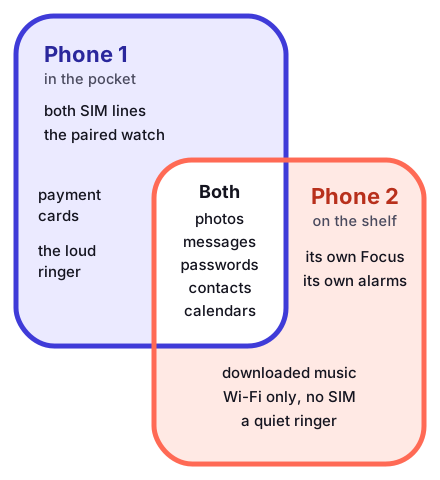
Same account, or a fresh start?
If the second device is yours, sign it in to your own account and let everything follow you: messages, photos, passwords, the lot. If it is going to someone else, even someone you live with, erase it and let them set it up as their own. Sharing an account between two people feels convenient for about a week, and then your messages start appearing on their screen.
- Both lines and all calls
- The watch is paired to this one
- Payments and tickets
- Every notification, loud
- Wi-Fi only, no SIM inside
- Music, timers, the odd video call
- A second place to approve sign-ins
- Nearly every notification, off
Jobs a retired phone does well
Kitchen radio and timer
Propped against the tiles, plugged into a small speaker. Nobody panics when it gets flour on it.
Spare camera
With the right continuity feature switched on, a nearby computer can use the phone as its camera for calls.
Second key holder
Because it is signed in to my account, it counts as a trusted device and can show the approval prompt when I sign in somewhere new. That is exactly what saved me the morning Phone 1 was flat.
Keeping Phone 2 alive
- Update it monthlyA spare that is three releases behind will insist on updating at the exact moment you need it. I do it on the first Sunday of the month.
- Do not cook the batteryA phone that sits on a charger all year runs warm. Newer iOS versions offer a charge limit or optimised charging; use whichever your model has, or simply unplug it now and then.
Everything buzzes twice
The first evening with two phones is a small orchestra. I fixed it in two moves. Phone 2 has its own Focus that is not shared across devices, so it stays quiet no matter what Phone 1 is doing. Then I turned off nearly all of its notifications, keeping only timers and family calls.
Phone plus tablet, phone plus watch
A tablet on the same account can ring for calls and show texts that arrive on the phone’s lines. It is a deliberate switch, not a default; the handoff page covers it. The watch simply mirrors Phone 1, so notifications from both lines land on the wrist. I do not own the cellular model, so I have no notes on giving a watch a line of its own.