Sharing in a family, without oversharing
Four of us, six devices, one grandmother with a tablet. The family group ties it together, as long as everyone knows what is shared and what is not.
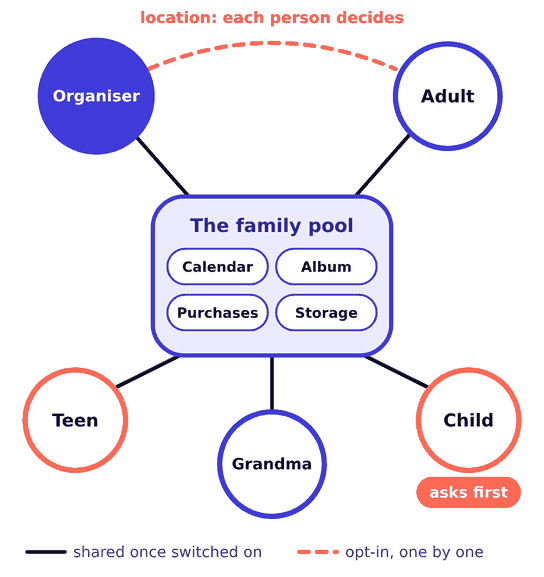
How the group works
One adult is the organiser and invites the others, up to five more people. Everyone keeps their own account, their own messages and their own photo library. Sharing is switched on feature by feature, so joining the group does not open anyone’s phone to anyone else.
- Apps and media that support family sharing
- Subscriptions with a family tier
- One storage pool, private contents
- A family calendar and reminders list
- Messages and call history
- Your own photo library
- Notes, mail and browsing
- Health and fitness data
Five things we share, and how
Calendars
A family calendar appears on its own. We added two more: School, and Who Has The Car. Each has one colour on every device, and each person chooses whether a shared calendar may send them alerts.
Albums
A shared album is a place where you post chosen pictures. A shared library is different: it merges whatever you move into it, and anyone in it can edit or delete. We use an album for the whole family and a shared library only between the two adults.
Purchases
With purchase sharing on, family purchases are billed to the organiser’s payment method. How a family runs its money is not my business; just know where the bill lands before you flip the switch.
Location
Each person decides whether the family can see where they are, and can pause it. We agreed the rules at the dinner table instead of quietly switching it on.
Children’s devices
A child gets a child account inside the group. From my phone I can set downtime, app limits and who they may talk to, and purchase requests arrive as a prompt I approve or decline. The Screen Time passcode is not the passcode of the device, and the children do not know it. So far.
What we got wrong the first time
We handed our daughter my old phone still signed in as me. Within a day she had my contacts and I had her game notifications. The fix was dull and complete: erase, set up fresh under her own child account, add her to the group. The order is on the checklists page.